7 Tips to Troubleshoot Laser Power Supply Failure?

Time:2026-10-18 Author:Oliver
0%

A failed laser power supply can stop production without warning. The laser may refuse to start, flicker during operation, or produce weaker output. In some cases, the cooling fan runs, but the system still shows no laser emission. These symptoms can look similar, yet their causes may differ significantly.

This guide explains how to troubleshoot laser power supply failure through practical, controlled checks. It covers input voltage, wiring, cooling, interlock circuits, warning indicators, and output connections. Always begin with the equipment manual and isolate power before opening any enclosure. High-voltage components can retain dangerous energy after shutdown. Do not guess.

A reliable diagnosis depends on measured evidence, not visual inspection alone. Check connectors for discoloration, listen for unusual fan noise, and record error codes before resetting the machine. A multimeter may help trained technicians verify input and control signals. However, incorrect probing can damage the supply or create a serious shock hazard. When measurements seem inconsistent, stop and reassess the test setup.

Seven practical tips can help narrow the fault without replacing parts unnecessarily. They also encourage a careful distinction between a defective power supply and problems in the tube, controller, cooling loop, or safety circuit. Not every failure is obvious. Sometimes, a loose signal wire creates a symptom that looks like a major electronic fault. That mistake is common. Careful troubleshooting saves time, protects equipment, and supports safer repair decisions.
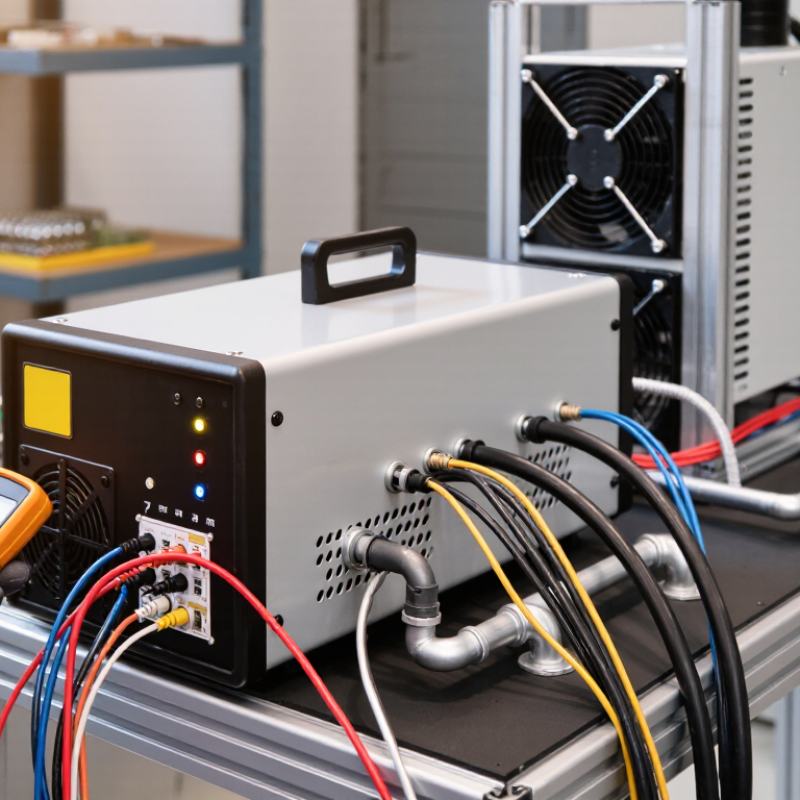
7 Tips to Troubleshoot Laser Power Supply Failure?

Apply IEC 60825-1 Class 4 Safety Controls Before Troubleshooting

7 Tips to Troubleshoot Laser Power Supply Failure

Apply IEC 60825-1 Class 4 controls before opening the cabinet. Class 4 emissions can injure eyes and skin, ignite materials, and remain hazardous after reflection. IEC 60825-1:2014 defines this risk category, while the OSHA Technical Manual recommends controlled access, interlocks, warning signs, and suitable protective eyewear. Treat the laser as energized until a competent laser safety officer verifies otherwise.

Use these seven checks:

  1. restrict the room, remove reflective tools, and confirm the beam path is enclosed.
  2. Verify the emergency stop and interlock circuit without bypassing either device.
  3. Apply electrical lockout and wait for capacitor discharge.
  4. Measure the DC bus with a properly rated meter.
  5. Inspect fuses, connectors, cooling fans, and burn marks.
  6. Compare input voltage and control signals with the service specification.
  7. Test the supply only with an approved dummy load or enclosed system.

Eyewear must match wavelength, pulse behavior, and required optical density. Generic glasses are not enough.

A common field mistake is treating a darkened connector as the root cause.

It may be an effect of overload, poor cooling, or unstable feedback. Do not reset repeatedly. That can worsen damage. The Laser Institute of America’s ANSI Z136.1 guidance emphasizes documented procedures, trained personnel, and hazard evaluation.

Record every measurement, including the failed condition. If the enclosure, interlock, or discharge status is uncertain, stop and escalate. Safety controls are not paperwork; they are the diagnostic boundary.

Classify Seven Failure Symptoms: No Output, Arcing, Ripple, or Overheating

7 Tips to Troubleshoot Laser Power Supply Failure

Classify Seven Failure Symptoms: No Output, Arcing, Ripple, or Overheating

A failed laser power supply rarely gives one clear warning. It may show no output, weak output, unstable current, visible arcing, excessive ripple, overheating, or repeated thermal alarms.

Uptime Institute’s 2024 Annual Outage Analysis reported that 54% of respondents valued their latest outage above $100,000.

That figure explains why early electrical checks matter. In field work, technicians should record input voltage, output current, alarm history, cooling airflow, and load conditions before replacing parts.

Tip 1: No output often points to an open fuse, interlock, failed rectifier, or control signal. Verify the enable circuit first.

Tip 2: Low output may result from aging capacitors or incorrect feedback sensing.

Tip 3: Ripple on the beam usually follows degraded capacitors, loose terminals, or poor grounding. Use an oscilloscope with suitable probes. Never guess from beam brightness alone.

Tip 4: Arcing leaves carbon marks, sharp smells, or clicking sounds. Shut down immediately and inspect insulation only after safe discharge.

Tip 5: Overheating can come from blocked filters, failed fans, or excessive load duty. Measure temperature near the heatsink, not only at the cabinet door.

Tip 6: Repeated thermal alarms may indicate a sensor fault, but airflow should be proven first.

Tip 7: Audible buzzing or intermittent shutdowns can signal magnetic stress, loose hardware, or unstable mains power. IEC 61000 measurement practices support checking voltage quality under load.

I have seen replacement supplies fail again because the original cooling problem was missed. That mistake is expensive.

A qualified technician should handle energized testing and high-voltage discharge.

Verify 90–264 VAC Input, Fuses, and DC Bus Against Nameplate Ratings

7 Tips to Troubleshoot Laser Power Supply Failure

Verify 90–264 VAC Input, Fuses, and DC Bus Against Nameplate Ratings

Tip 1: Start with the nameplate, not assumptions.

Confirm the measured input remains within the listed 90–264 VAC range under load. Use a properly rated meter and insulated probes. A loose terminal can show normal voltage with no load, then collapse during operation. Safety comes first. Disconnect power before opening covers, and let a qualified technician handle energized testing.

Tip 2: Inspect both input and internal fuses.

Match the exact fuse type, voltage, and current rating shown in the service documentation. Never install a larger fuse to keep production moving. I have seen this mistake turn a simple overload into damaged wiring. Look for darkened holders, heat marks, or a fuse that fails again immediately. That repeat failure is useful evidence, not just an inconvenience.

Tip 3: Check the DC bus only with approved procedures.

The bus may remain charged after shutdown, sometimes for several minutes. Follow the equipment’s discharge time, then verify zero voltage with a suitable meter. If the bus is unexpectedly low, compare its reading with the nameplate and service manual. A weak rectifier, failed capacitor, or missing AC phase may be involved. Readings can mislead me when the meter or ground reference is wrong. Record the values, conditions, and fault timing before replacing parts.

Check 18–22°C Cooling Water, Interlocks, Fans, and Gas Flow

7 Tips to Troubleshoot Laser Power Supply Failure?

Laser power supply faults often begin with heat, unstable cooling, or restricted airflow. Keep cooling water between 18–22°C, unless the equipment manual specifies another range. Check the reservoir, pump, filter, and flow sensor. A warm return line can reveal hidden heat transfer problems. According to the U.S. Department of Energy’s 2022 Industrial Decarbonization Roadmap, industry uses nearly one-third of U.S. energy. Efficient cooling therefore supports both reliability and energy control.

Tip 1: Inspect interlocks before opening electrical panels. Door switches, emergency stops, and water-flow sensors must respond correctly. Tip 2: Clean fan guards and confirm steady airflow around the power supply. Dust may look harmless, but it can raise internal temperatures quickly. Tip 3: Check gas flow, pressure, and leaks at the regulator and tubing. Low or fluctuating gas flow can imitate an electrical failure. Follow IEC 60825-1 safety practices and isolate power before servicing. Never bypass an interlock for testing.

Record temperatures, flow readings, alarm codes, and restart times. Compare them across several operating cycles. A single normal reading proves little. Some failures are embarrassingly simple, such as a loose connector or clogged filter. Still, assumptions cause expensive mistakes. If the supply trips repeatedly, stop resetting it and request qualified electrical testing. The U.S. Department of Energy’s maintenance guidance also emphasizes measurement-based troubleshooting, not guesswork.

7 Tips to Troubleshoot Laser Power Supply Failure

Check cooling water at 18–22°C, interlocks, cooling fans, gas flow, input power, DC-bus safety, and electrical connections before replacing the power supply.

Example diagnostic record: a value of 1 indicates that the checkpoint meets the required condition, while 0 indicates a failed or unverified condition. Gas flow must always be checked against the equipment manufacturer’s specified setpoint.

Measure 20–30 kV Output and Ripple Only With Properly Rated Probes

7 Tips to Troubleshoot Laser Power Supply Failure?
Measure 20–30 kV Output and Ripple Only With Properly Rated Probes
Before touching the cabinet, isolate input power, follow approved lockout procedures, and verify zero energy with a suitable meter. High voltage may remain stored after shutdown. Only trained technicians should access the supply. Wear the required protective equipment, remove conductive jewelry, and keep the work area dry. Never use a general-purpose multimeter for a 20–30 kV circuit.
Use a differential high-voltage probe rated above the supply’s maximum output and possible transient peaks. Check its voltage, category, bandwidth, and insulation ratings. Connect the probe exactly as its instructions specify. Confirm the oscilloscope ground arrangement before energizing the circuit. An incorrect ground path can create an arc, damage equipment, or cause severe injury. Keep your hands away from the probe and energized enclosure.
Measure output voltage under the correct operating load, not only at idle. Record the DC level, ripple amplitude, ripple frequency, and waveform shape. A steady output with excessive ripple can indicate aging capacitors, poor connections, or control instability. Inspect connectors for heat discoloration and listen for unusual buzzing. I have seen rushed checks produce false conclusions because the probe was poorly positioned. My own mistake was trusting a normal voltage reading too quickly. Compare results with service specifications and earlier maintenance records. Small deviations matter.

FAQS

What input voltage should I verify first?

Check that loaded input voltage stays within the 90–264 VAC nameplate range. A loose terminal may appear normal without a load. Measure safely. Use insulated, properly rated probes.

How should I inspect the fuses?

Check internal and input fuses against the specified type, voltage, and current ratings. Never install a larger fuse. Look for dark holders, heat marks, or immediate repeat failures. A recurring fuse failure provides important evidence.

Why should I check the DC bus after shutdown?

The DC bus can remain charged for several minutes. Follow the documented discharge time, then verify zero voltage with a suitable meter. An unexpectedly low reading may suggest a rectifier, capacitor, or phase problem. Meter errors can mislead me.

What cooling water temperature is generally recommended?

Keep cooling water between 18–22°C unless the equipment manual specifies another range. Inspect the reservoir, pump, filter, and flow sensor. A warm return line may reveal poor heat transfer. Record temperatures during several operating cycles.

Which simple checks can reveal overheating or airflow problems?

Confirm steady airflow around the power supply. Clean fan guards and remove visible dust. Check door switches, emergency stops, and water-flow sensors. Never bypass an interlock. Simple faults happen.

Can gas flow problems resemble electrical failure?

Yes. Low, unstable, or leaking gas flow can imitate a power supply fault. Check regulator pressure, tubing, connections, and flow readings. Record alarm codes and restart times. One normal reading proves little.

How can I safely measure a 20–30 kV output?

Only trained technicians should perform this measurement. Isolate power, follow approved lockout procedures, and verify zero energy. Use a differential high-voltage probe rated above maximum output and transient peaks. Never use a general-purpose multimeter.

What should I record when checking output ripple?

Measure under the correct operating load, not only at idle. Record DC level, ripple amplitude, frequency, and waveform shape. Excessive ripple may indicate aging capacitors, poor connections, or control instability. I once trusted a normal voltage reading too quickly. That was a mistake.

Conclusion

Learning how to troubleshoot laser power supply failure begins with safety. Before opening or testing the system, apply IEC 60825-1 Class 4 controls, restrict access, isolate stored energy, and use qualified personnel. First classify the symptom: no output, intermittent operation, arcing, excessive ripple, overheating, or abnormal shutdown. This classification helps narrow the inspection and prevents unnecessary component replacement.

Confirm that the input supply is within the 90–264 VAC range specified on the nameplate, then inspect fuses and verify the DC bus using properly rated instruments. Check cooling water temperature, ideally around 18–22°C, along with flow, interlocks, fans, ventilation, and gas delivery. If high-voltage testing is necessary, measure the 20–30 kV output and ripple only with probes and equipment rated for the expected voltage. Record readings, compare them with the system specifications, and stop immediately if arcing, damaged insulation, overheating, or unstable conditions are observed.

Oliver

Oliver

Oliver is a seasoned marketing professional with a wealth of expertise in driving brand awareness and engagement. With a deep understanding of our company's product offerings, he consistently delivers high-quality content that enriches our professional blog. His insights not only shed light on......